DeGirum PySDK
One SDK. Multiple hardware targets. Zero rewrites.
Edge AI deployment shouldn't mean rewriting your app every time you change hardware. PySDK gives you a single Python API for running inference on AI Hub, a local runtime, or a remote AI server, so you can prototype fast, validate on real hardware, and ship to production without starting over.
import degirum as dg

  # Declaring variables
  # Set your model name, inference host address, model zoo, and AI Hub token.
  your_model_name = "model-name"
  your_host_address = "@cloud" # Can be "@cloud", host:port, or "@local"
  your_model_zoo = "degirum/public"
  your_token = "<token>"

  # Specify a path to your image file
  your_image = "<path to your image>"

  # Loading a model
  model = dg.load_model(
      model_name = your_model_name,
      inference_host_address = your_host_address,
      zoo_url = your_model_zoo,
      token = your_token
      # optional parameters, such as output_confidence_threshold=0.5
  )

  # Perform AI model inference on your image
  inference_result = model(your_image)

  # Print the inference result
  print(inference_result)
What You Get with PySDK
Simple, Consistent API
Load a model, point to an inference target, run inference. The same three calls work on AI Hub and on your edge device. No API changes between dev and production.
See the quickstart >One Workflow Across Hardware
HAILORT, DEEPX, OPENVINO, AXELERA, MEMRYX, AKIDA, RKNN, TFLITE, N2X: PySDK supports runtimes without requiring a separate codebase for each.
Explore runtimes and drivers >Integrated with DeGirum AI Hub
Browse public model zoos and run hosted inference on real hardware with just a token. When you're ready to deploy locally, load the same models on your edge device.
Get started on AI Hub >


Build Once. Deploy Where It Fits. Develop locally, validate quickly with hosted inference, and move to edge devices when you're ready.
Changing hardware shouldn't mean changing your app. PySDK keeps your inference calls identical whether you're running on AI Hub, a local runtime, or a remote AI server, so your development cycle stays clean as your deployment target evolves.
Compare inference options >- Run your workflow your way.One parameter separates your deployment targets. Set inference_host_address to
@cloudfor AI Hub,@localfor your machine, orhost:portfor a remote AI server. Everything else in your code stays exactly the same. - Adapt to the devices you have.Pick the runtime and driver for your hardware (HAILORT, DEEPX, OPENVINO, or any other supported target) without changing how your app loads models or calls inference.
- Move faster with ready-to-use models.Start with pre-compiled models from AI Hub public model zoos and skip straight to building. Bring in your own models when you need custom pre- and post-processing or tuned performance. The workflow stays consistent either way.
Runtimes and Drivers
PySDK supports a wide range of runtimes and hardware targets. Install the drivers for your platform and the same model load and inference calls work across all of them. No vendor lock-in, no separate SDKs to maintain.
AI Hub + PySDK Workflow
Use AI Hub to browse public model zoos, run hosted inference on real edge AI hardware, and validate your pipeline before you commit to a device. When you're ready to build, load the same models directly in your PySDK application. No migration. No changes to your inference calls.
Explore integration >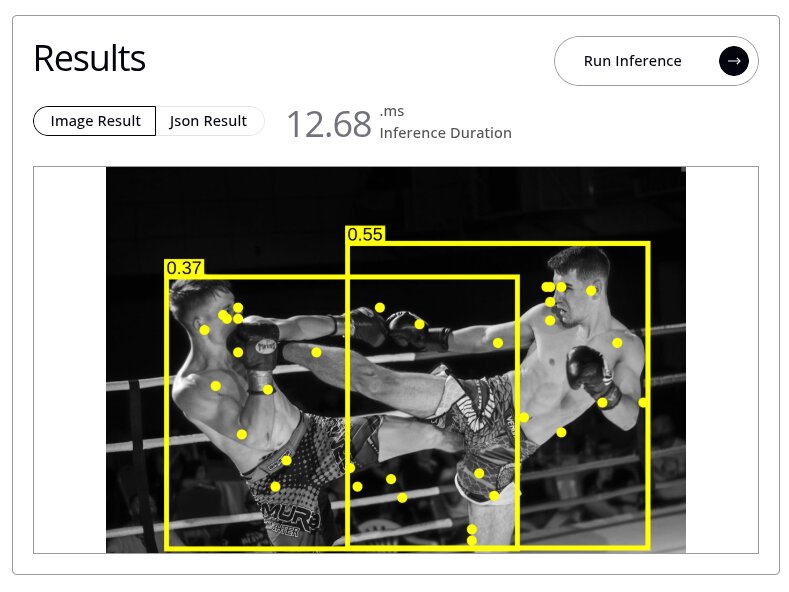
PySDK Quickstart
Load a model from a zoo, connect to an inference target, and run your first inference with structured results.
Read the quickstart >PySDK Installation
Install the package and set up optional components for your runtime and deployment target.
Install PySDK >Frequently Asked Questions
What is DeGirum PySDK?
'%3e%3cpath%20d='M8%201V15M1%208H15'%20stroke='white'%20stroke-width='2'%20stroke-linecap='round'%20stroke-linejoin='round'/%3e%3c/g%3e%3cdefs%3e%3cclipPath%20id='clip0_302_416'%3e%3crect%20width='16'%20height='16'%20fill='white'/%3e%3c/clipPath%3e%3c/defs%3e%3c/svg%3e)
DeGirum PySDK is a Python library for loading AI models from a model zoo and running inference using a consistent API, with a low barrier to entry and a focus on efficient deployment workflows.
Where can PySDK run inference?
PySDK can run inference on DeGirum AI Hub (@cloud), on supported local hardware (@local), or by sending requests to a DeGirum AI server (host:port)
What is the difference between @cloud, @local, and host:port?
@cloud: Runs inference on DeGirum's cloud-hosted hardware. Intended for hosted inference workflows and prototyping without local setup.
@local: Runs inference on the machine where your code is running, using supported local runtimes and drivers.
host:port: Runs inference on a remote machine running DeGirum AI Server, so your client app can be separate from the device doing inference.
What runtimes and hardware targets does PySDK support?
PySDK supports a wide range of runtimes and hardware targets, including Hailo (HAILORT), DEEPX (DEEPX), Intel (OpenVINO [CPU/GPU/NPU]), Axelera AI (AXELERA), MemryX (MEMRYX), BrainChip (AKIDA), Rockchip (RKNN), Google (TFLITE/EDGE TPU), and DeGirum (N2X). You can evaluate multiple platforms without rewriting your app. See the installation guide for the full compatibility chart and driver setup instructions for your target.
Where do models come from, and what is a model zoo?
A model zoo is the repository PySDK connects to for listing and loading models, configured via zoo_url when you load a model. It can be a cloud zoo (such as the public model zoos on AI Hub) or a local directory you manage yourself, including a folder used by a DeGirum AI Server.
What do PySDK results look like, and can I generate overlays?
Inference returns a structured results object you can print directly or access field by field in code. For visualization, PySDK can generate an annotated image with predictions drawn over the original (bounding boxes, classification labels, pose keypoints, or segmentation masks) depending on the model type. That means you can go from raw inference to a labeled output image without any additional post-processing code. See the PySDK documentation for the full results API.
How do I get started and where do I get support?
Start with the PySDK Quickstart for a working end-to-end example, then follow the Installation guide to set up drivers for your platform.
For questions and troubleshooting, the DeGirum Community is the best place to get help from the team and other developers.